Where does the money go when you use AI?
Table of Contents
One AI coding agent can send 400 times more input than a short chat. Follow AI spend from one developer to a whole company, and learn five habits to cut waste.
This post walks through tokenomics, context engineering, harness engineering, and FinOps for AI. At every level, one rule holds: spend tokens where the value is proven.
Watch the video#
The 15-minute video walks through every worked model and diagram in this post, from a single prompt to enterprise FinOps.
- 0:00 Teaser
- 0:29 Where the AI money goes
- 1:37 Tokenomics for one developer
- 5:06 Context engineering
- 6:52 Harness engineering
- 9:20 Teams and value
- 11:40 FinOps at scale
- 14:26 The playbook
Where the AI money goes#
Every time you use AI, a meter runs. For a quick question, it barely moves. For a coding agent that works for an hour, it moves a lot. Across a team or a company, those loops turn into real budget.
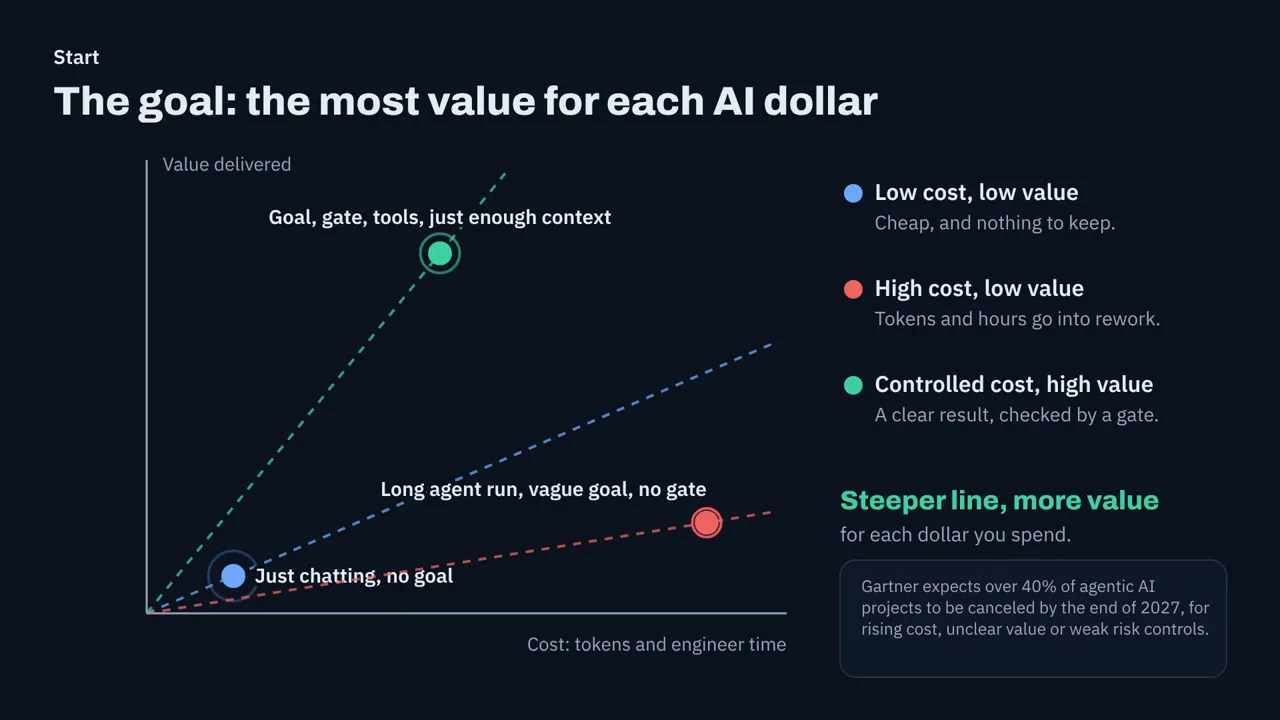
Picture every AI task as a dot on a chart. Cost goes across the bottom (tokens plus your time), and value goes up the side:
- Chatting with no goal sits in the bottom left: low cost and low value.
- A long agent run with a vague goal and no gate drifts to the bottom right: high cost and still low value.
- A clear goal, a defined gate, the right tools, and just enough context pushes the dot up and left: cost stays in check while value climbs.
The score that matters is the slope: value per dollar. Without that discipline, AI projects stall. Gartner predicts over 40% of agentic AI projects will be canceled by the end of 2027.
Tokenomics for one developer#
Level 0: A quick chat#
Start with the simplest case. A developer asks a chat assistant two short questions about keyset pagination. Each turn sends the conversation history again, so the second prompt includes the first, though the history stays tiny. The whole exchange uses about 1,000 tokens and costs under half a cent.
The value is small as well: one fact and a few minutes saved. There is no goal, no gate, and no lasting artifact. Low cost, low value.
The four meters of a token bill#
A token bill runs on four separate meters. Using Claude Sonnet 5.5 list pricing (November 2026) as a reference point:
| Meter | What it bills | List price per 1M tokens | Relative rate |
|---|---|---|---|
| Input | Everything you send to the model | $2.00 | 1x |
| Cache write | Writing the start of a prompt to the 5-minute cache | $2.50 | 1.25x |
| Cache hit | Reading a cached prompt prefix | $0.10 | 0.05x (1/20 of input) |
| Output and reasoning | Everything the model writes, reasoning included | $10.00 | 5x |
Agents read far more than they write. Manus reports roughly 100 input tokens for every 1 output token. Your bill equals rate times volume. The provider sets the rate; your prompts, context, and agent loops set the volume.
Why one agent task sends 402x more input than chat#
When you hand work to a coding agent, it runs in a loop: act, observe, revise, verify, and repeat. On every step, the agent sends the full context again: system instructions, tool definitions, files, tool outputs, and conversation history.
In an illustrative 60-step task where the context starts at 20,000 tokens and grows by 4,000 tokens each step:
- By step 60, the context window reaches 256,000 tokens.
- Across all 60 steps, the agent sends 8,280,000 input tokens.
- A typical 8-turn chat sends about 20,600 input tokens.
That is about 402 times more input for a single task. Even in shorter runs, Anthropic has noted that single agents use roughly 4x the tokens of chat, and multi-agent systems use roughly 15x.
Where the money goes inside that loop#
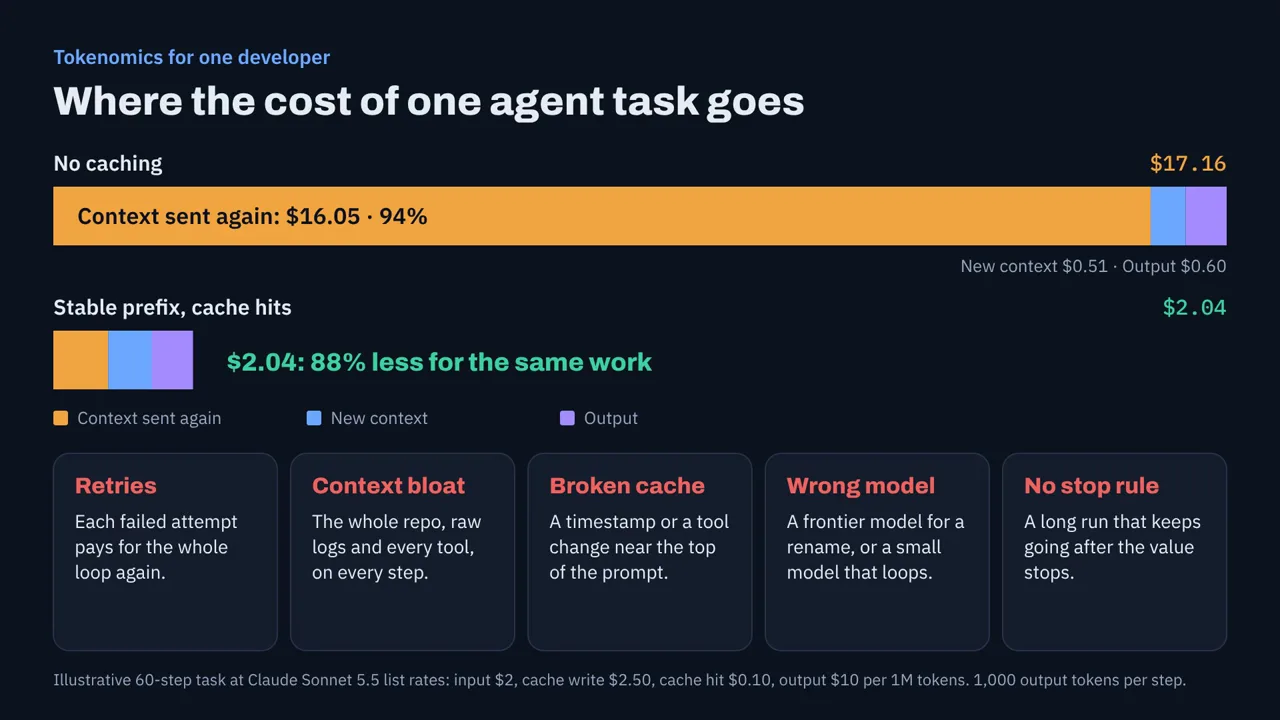
Price that same illustrative 60-step task (with 1,000 output tokens per step) at Claude Sonnet 5.5 list rates:
- With no caching: the task costs $17.16. About $16.05 (94%) pays to resend context the agent already sent on earlier steps. New context is $0.51, and output is $0.60.
- With a stable prompt prefix and cache hits: most of the repeated input becomes a $0.10/1M cache hit. The exact same work drops to $2.04, which is 88% less.
Five habits grow an agent bill without adding value:
- Retries after vague instructions or late checks.
- Context bloat from unrelated files and raw logs.
- A broken prompt cache.
- Picking the wrong model for the task.
- Running without a stop rule.
Preparation cuts spend before the first token#
In my talk The Art and Science of Vibe Coding, I built the same feature twice using the same model, harness, and prompt:
- Run A (unprepared): received a vague request, read the whole repository, and failed tests repeatedly. Total cost: 102 credits.
- Run B (prepared): started with "done" defined as a test, a narrow task brief, and repository rules in a short
AGENTS.mdfile. It read a few files, made one edit, and passed the gate. Total cost: 72 credits (29% fewer).
Picking the right model means counting human review time#
Route small tasks to a small model (such as Haiku), standard engineering work to a mid-sized model (such as Sonnet), and complex multi-file changes to a larger model (such as Opus).
To see why the cheapest token rate often costs the most overall, measure the cost per accepted fix of one failing test. In an illustrative model that includes 8 minutes of human review per attempt at $100/hour ((token cost + review time) / pass rate):
| Model tier | Example list price (in / out per 1M) | Pass rate | Cost per accepted fix |
|---|---|---|---|
| Too light (Haiku 5.5) | $0.10 / $0.50 | 35% | $38.18 |
| Right size (Sonnet 5.5) | $2.00 / $10.00 | 90% | $15.48 |
| Too heavy (Fable 5.2) | $8.00 / $40.00 | 93% | $16.92 |
The token price is the small number. Your review time and the retries are the big ones.
Context engineering#
Context engineering is deciding what enters the context window on each step. Anthropic's guide on effective context engineering treats context as a finite resource with diminishing returns:
- Too little context (just saying "fix it") forces the agent to guess and burn retries.
- Too much context (the whole repository, raw logs, and 40 MCP tools) makes the model lose focus while you pay for every extra token. Chroma tested 18 models and found they became less reliable as input grew.
- Just enough context includes five items: the goal, the test that defines done, the files that matter, the repository rules, and only the tools this task needs.
The cheapest fix: prompt order and cache hits#
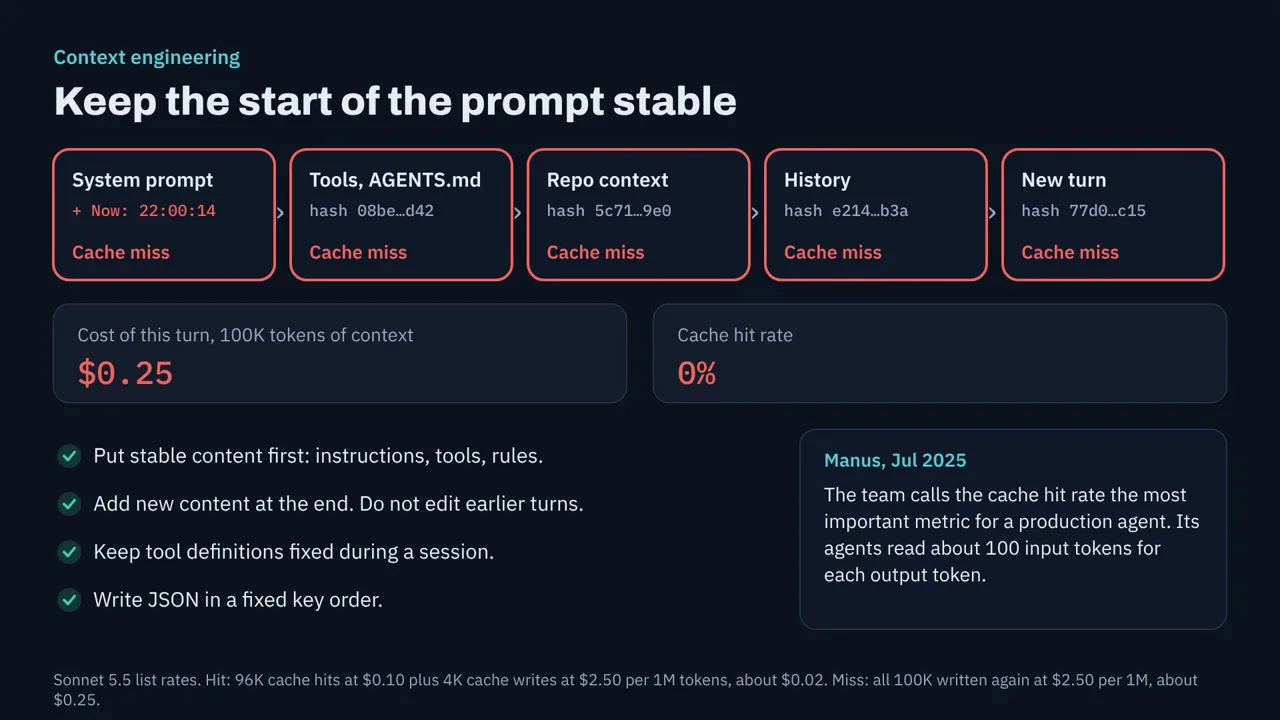
Providers cache prompts from the start, block by block. Put stable blocks first (system prompt, tool definitions, AGENTS.md), follow with repository context and history, and append each new turn at the end.
On a 100,000-token turn at Claude Sonnet 5.5 list rates:
- Cache hit: 96K cached tokens ($0.10/1M) plus 4K new cached tokens ($2.50/1M) costs about $0.02.
- Cache miss: placing a changing timestamp at the top of the system prompt invalidates every block after it, writing all 100K tokens again for about $0.25.
Four rules protect your cache hit rate:
- Put stable content first (instructions, tools, and repo rules).
- Append new content at the end instead of editing earlier turns.
- Keep tool definitions fixed during a session.
- Write structured JSON with a fixed key order.
Manus calls cache hit rate the single most important metric for a production agent.
Five habits that cut one task by 95%#
Apply five habits one by one to the $17.16 illustrative 60-step task:
| Step | Habit applied | Task cost |
|---|---|---|
| Baseline | No caching, full context, late checks | $17.16 |
| 1 | Keep a stable prompt prefix for cache hits | $2.04 |
| 2 | Grant only the tools this task needs (keeps focus, cuts tool bloat) | Focused |
| 3 | Trim context to relevant files and summaries | $1.34 |
| 4 | Start a fresh session at checkpoints with a short progress file | $1.19 |
| 5 | Run cheap checks first so failures stop early | $0.94 |
That drops the same work from $17.16 to $0.94, roughly 95% less. At that point, output tokens make up half of the remaining bill, so asking for shorter answers on simple steps saves even more.
Harness engineering#
An agent is a model plus a harness: everything surrounding the model.
- The builder harness comes with your coding tool: system prompt, built-in tools, the agent loop, and compaction.
- Your harness is what your team controls:
AGENTS.md, skills, MCP access, hooks, automated tests, CI checks, and code review.
Context engineering asks what the agent sees. Harness engineering asks what the system checks, stops, and corrects. OpenAI's Codex team built about a million lines of code with agents and reported that early progress was slow mainly because the environment was underspecified.
Guides before, sensors after#
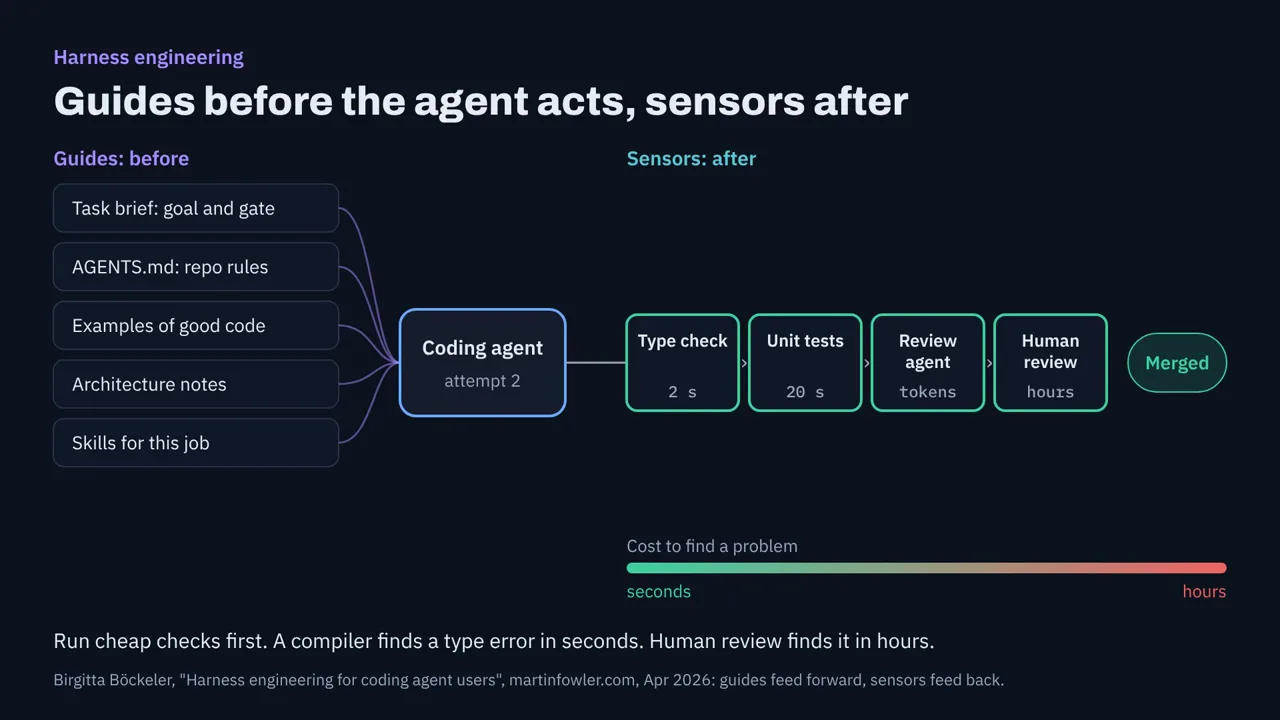
Birgitta Böckeler splits a harness into two halves:
- Guides (before the agent acts): the task brief with its goal and gate,
AGENTS.mdrepo rules, examples of good code, architecture notes, and skills for the job. - Sensors (after the agent acts): a type check (2 seconds), unit tests (20 seconds), a review agent (tokens), and human review (hours).
Run the cheapest checks first. On attempt one, a failing unit test sends the work straight back to the agent in seconds. On attempt two, every check passes and the change merges. A compiler catches a type error in seconds; human review catches it hours later.
Long-running tasks need memory outside the context window#
Long-running tasks produce the largest bills. Each new session starts with zero memory, like an engineer starting a shift with no handover notes. Without a harness, each session re-reads the repository, repeats finished work, and declares the job done too early. Cost climbs while value stays flat.
Anthropic's research on long-running agent harnesses (and follow-up harness design work) uses a simple pattern:
- The first session writes a feature list with every feature marked failing, plus a short progress file.
- Each later session reads the progress file, builds one feature, tests it, commits the work, and updates the file.
Now value climbs alongside cost, because project memory lives on disk rather than inside a bloated context window.
Put budget gates on every long run#
Every long run needs fixed checkpoints and hard stop rules. Consider two illustrative runs under a $40 budget:
- Run A spends $4 an hour, passes value checks at 2, 4, and 6 hours ("Do the tests pass? Can you demo it?"), and finishes at $32.
- Run B spends $4.75 an hour and starts drifting. At the 4-hour value check, tests fail and the gate stops the run at $19. Left unattended, it was heading to $55. The gate saved about $36.
Set five rules before starting a long run:
- A token budget for each task.
- An automatic stop and report when the budget is reached.
- A maximum number of attempts per gate.
- Value checks at fixed points (passing tests and a working demo).
- A person who approves the next stage.
Teams and value#
The prototype trap#
Now move from one developer to a team of six. Each engineer has an idea and hands it to an agent. Because AI makes reaching an advanced prototype easy, all six build one.
In an illustrative two-day sprint:
- Token bill: about $1,400.
- Engineer time: 96 hours, or about $9,600 at $100/hour.
- At the customer demo: one prototype fits, two fit in part, and three go in the bin.
The token bill was only a fraction of the waste. Nobody agreed on the goal with the team or the customer before starting.
Big specs up front versus thin slices#
AI also makes writing a huge specification up front feel cheap. An agent generates a 40-page spec, and other agents implement all of it. Five weeks later, the customer sees the result and one early assumption turns out to be wrong. Five weeks of work sit on top of that assumption.
Building in thin slices with a demo every few days exposes that same wrong assumption on day three, where the fix costs a day. The later feedback arrives, the more every mistake costs. Iterative delivery, DevOps, and Agile still apply, and spec-driven development works best when specs stay small and get tested early.
AI is an amplifier, and gut feel is unreliable#
Two studies show why team discipline matters more than raw generation speed:
- DORA (2025) surveyed nearly 5,000 technology professionals, about 90% of whom use AI at work. Its central finding: AI is an amplifier. Teams with a shared goal, small batches, and fast feedback deliver more value faster. Teams with unclear goals and large batches get more rework and lower stability.
- METR (July 2025) ran a randomized trial with experienced open-source developers. Participants expected AI to make them 20% faster. Measured on real tasks, they were 19% slower.
Measure cost per accepted outcome#
The FinOps Foundation's State of Tokenomics draws a clear line: the token is the billing unit, and the outcome is the value unit.
Track what the software earns or saves divided by total cost, including review and rework time. Measure concrete outcomes:
- Revenue or sales linked to the feature.
- Time users need to finish a task.
- Friction such as errors and support tickets.
- Real user adoption.
Always include failed attempts in your unit cost. In a simple example, 1,000 attempts at $0.06 each cost $60. If 800 are accepted, each accepted outcome costs $0.075 (7.5 cents), rather than 6 cents.
FinOps at scale#
How daily developer spend turns into millions#
Anthropic's Claude Code cost documentation reports an average of about $13 per developer per active day across enterprise deployments, with 90% of users staying below $30 a day. Assuming 240 active working days a year, token spend alone scales fast:
| Organization size | Illustrative annual token spend |
|---|---|
| 1 developer | $3,120 |
| Team of 8 | $24,960 |
| Org of 200 | $624,000 |
| Enterprise of 5,000 | $15.6M |
Averages also hide the heavy tail. Look at the 10% of users spending above $30 a day and ask what outcomes they produce. High spend that ships valuable work is healthy; high spend from runaway loops is a leak.
Where AI spend leaks#
AI budgets flow from four main sources: model APIs, AI seats, GPUs, and AI features bundled inside SaaS products. Along the path to business outcomes, money leaks in five predictable places:
| Leak | Fix |
|---|---|
| Runaway agent loops | Budgets and hard stop rules |
| Duplicate prototypes | Shared customer goals first |
| Broken prompt caches | Stable prompt prefixes |
| Idle AI seats | Regular seat reviews |
| Spend nobody owns | API keys and tags per team |
In the video's illustrative spend-flow model, plugging those five leaks lifts the share of budget reaching a real business outcome from 56% to 92% without spending an extra dollar.
Inform, Optimize, Operate#
This is FinOps applied to AI, running the same three-phase loop covered in FinOps 101: A Simple Story/Tutorial:
- Inform: allocate every token to a team, a project, and a use case.
- Optimize: make stable prefixes, right-sized models, trimmed context, and cheap checks the default, and move non-urgent work to batch APIs at half price.
- Operate: enforce budgets, anomaly alerts, default models, run limits, and a monthly value review.
According to the FinOps Foundation State of FinOps 2026, 98% of FinOps teams now manage AI spend. Yet Harness's State of AI in FinOps 2026 found that 72% of organizations had a surprise AI bill in the past year, and 52% say nobody clearly owns AI cost.
Because tokens are a shared bill, every group asks a different question:
- Engineering asks which model fits the task.
- Product asks which feature earns its cost.
- Finance asks what we will spend next quarter.
- Leadership asks where to invest.
- Procurement asks whether to commit to reserved capacity.
- The customer asks whether this helps them do their job.
FinOps sits in the middle so all six groups work from the same numbers.
Put two lines on one chart#
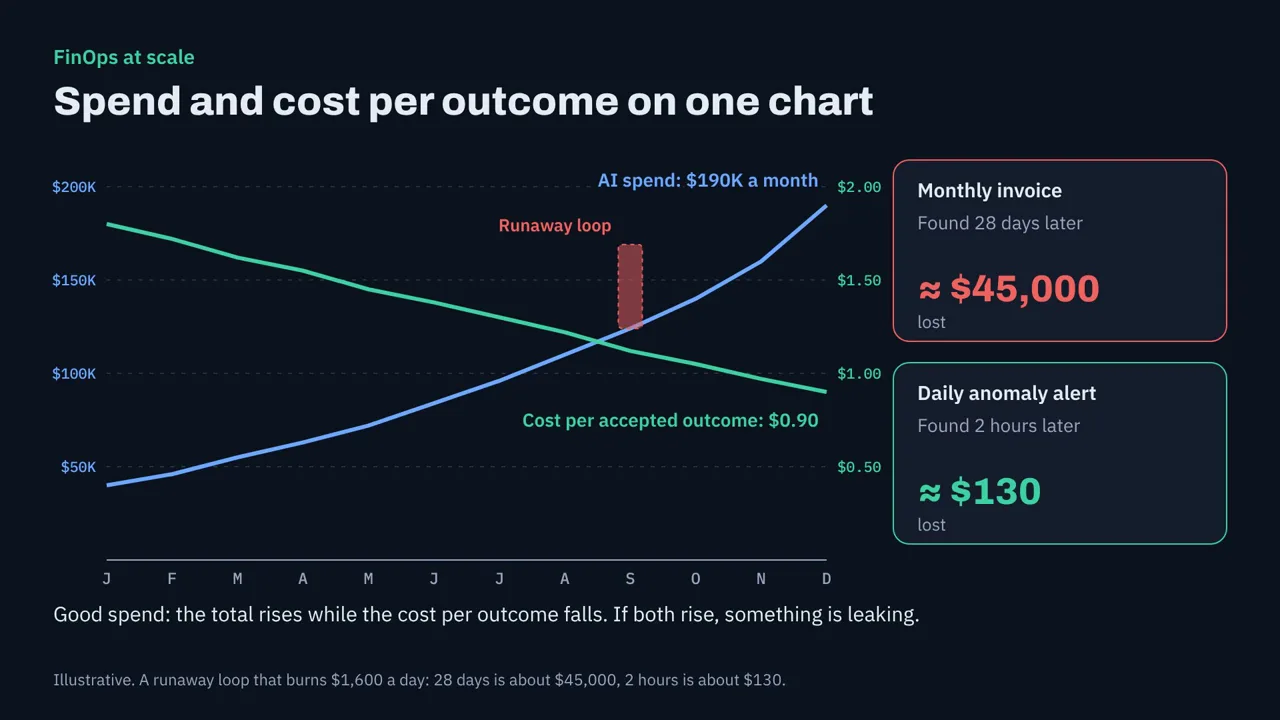
Track total AI spend and cost per accepted outcome on the same chart:
- Healthy growth: total spend rises while cost per accepted outcome falls.
- A leak: both lines rise together.
Detection speed matters. In an illustrative scenario, a runaway loop burns $1,600 a day:
- Caught on the monthly invoice (28 days later): about $45,000 lost.
- Caught by a daily anomaly alert (2 hours later): about $130 lost.
The playbook#
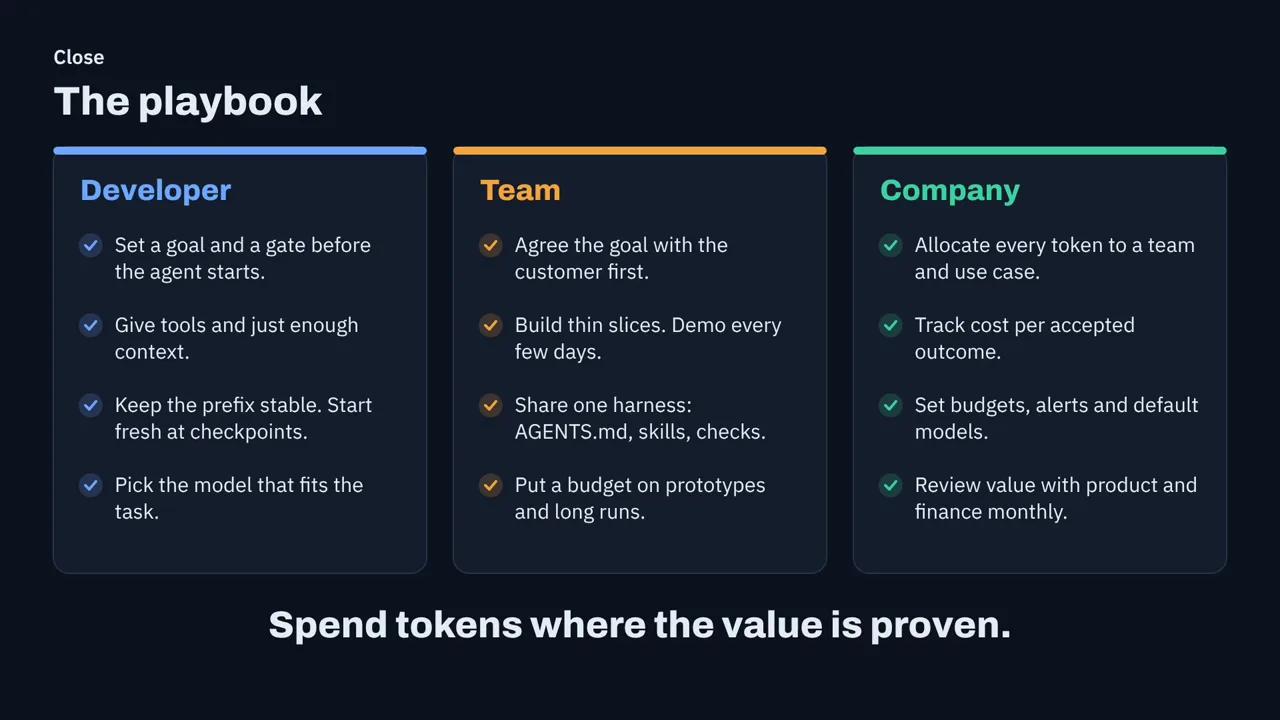
For each developer
- Set a clear goal and a testable gate before the agent starts.
- Give the agent only the tools and context the task needs.
- Keep the prompt prefix stable and start fresh sessions at checkpoints.
- Pick the model that fits the task, counting review time and pass rate.
For each team
- Agree on the goal with the customer before building prototypes.
- Build in thin slices and demo every few days.
- Share one harness:
AGENTS.md, skills, and automated checks. - Put explicit budgets on prototypes and long-running agent tasks.
For the company
- Allocate every token to a team, project, and use case.
- Track cost per accepted outcome alongside total spend.
- Set budgets, anomaly alerts, and sensible default models.
- Review AI value with product and finance every month.
Spend tokens where the value is proven.
Sources and further reading#
Prices change often, so check provider pages before using these figures in a budget. Worked examples labeled as illustrative above come from simple transparent models shown in the video.
- Anthropic: Claude API pricing (Nov 2026)
- Anthropic: Claude Code, Manage costs
- Anthropic: Effective context engineering for AI agents (Sep 2025)
- Anthropic: Effective harnesses for long-running agents (Nov 2025)
- Anthropic: Harness design for long-running application development (Mar 2026)
- OpenAI: Harness engineering (Feb 2026)
- Birgitta Böckeler: Harness engineering for coding agent users (Apr 2026)
- Birgitta Böckeler: Understanding spec-driven development (Oct 2025)
- Chroma: Context Rot (Jul 2025)
- Manus: Context engineering for AI agents (Jul 2025)
- METR: Measuring the impact of early-2025 AI on experienced open-source developer productivity (Jul 2025)
- DORA: State of AI-assisted Software Development (2025)
- FinOps Foundation: State of FinOps 2026
- FinOps Foundation: State of Tokenomics (Sep 2026)
- Harness: State of AI in FinOps 2026
- Gartner: Predicts over 40% of agentic AI projects will be canceled by end of 2027 (Jun 2025)
If this helped, subscribe to Building Apps with AI on YouTube for more.
Related posts#
- FinOps 101: A Simple Story/Tutorial: a step-by-step FinOps guide for Azure and FinOps for AI
- Beyond the Assistant: Integrating AI Agents Across the Enterprise Software Lifecycle: how AI agents fit across spec-driven development, testing, review, and operations